 Clickism
Tilesets
Tilesets are located in the signs/tilesets folder of your pack.
Tileset Image
A tileset image can be any size, but the default textures in ClickSigns are usually
16 x 16 pixels.
A texture is split into 9 parts, with all the corners being the same size:
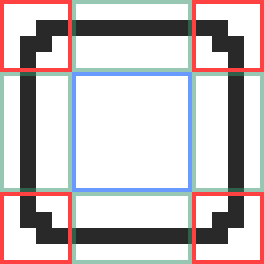
Red corners areas have the dimensions cornerSize x cornerSize.In this case, cornerSize is 4, so the corners are 4 x 4 pixels.
Corner areas will not be tiled, and the areas in between the corners, and the center, are tiled to fill the desired size of the tileset.
Adding a Tileset
To add a tileset, put your tileset file in the signs/tilesets folder.
You then need to define a tileset definition for your tileset,
since we need to let ClickSigns know the cornerSize of your tileset,
so that it is tiled correctly.
Tileset Definition
To add a tileset definition, create a json file with the
same name as your texture file, but replace .png with .tileset.json.
A tileset definition needs to define a cornerSize field,
and can optionally define custom colors:
{
  "cornerSize": 4,
  "colors": {
    "foreground": "black",
    "custom_color": "#4287f5"
    // ...
  }
}
You should at least define the foreground color, so that default symbols can automatically
adapt to your texture correctly.
Make sure to check out the Colors page if you haven't already.
Adding a Category
By default, your texture will not have a category (and show up under "Uncategorized").
To create a new category, all you need is a folder and a _category.json file inside
that folder. All tilesets in that folder (but not its subdirectories) will then belong to that category.
And then give a name to your category in the _category.json file:
{
  "name": "My Category"
}
You can also define a default tileset definition inside of _category.json, so that
you don't need to create a .tileset.json file for every texture in that category.
{
  "name": "My Category",
  "default": {
    "cornerSize": 4,
    "colors": {
      "foreground": "black"
    }
  }
}
However, a tileset definition in a .tileset.json file will always override the default definition in the category.
References
Tileset Definition (.tileset.json)
Prop
Type
Category Definition (_category.json)
Prop
Type